Installation Guide
This guide walks through every step required to deploy a self-hosted NetBird instance for GSISG, connect both office networks, integrate with Microsoft Entra ID, and roll out the client to approximately 200 Windows machines via TacticalRMM.
Architecture Overview
Section titled “Architecture Overview”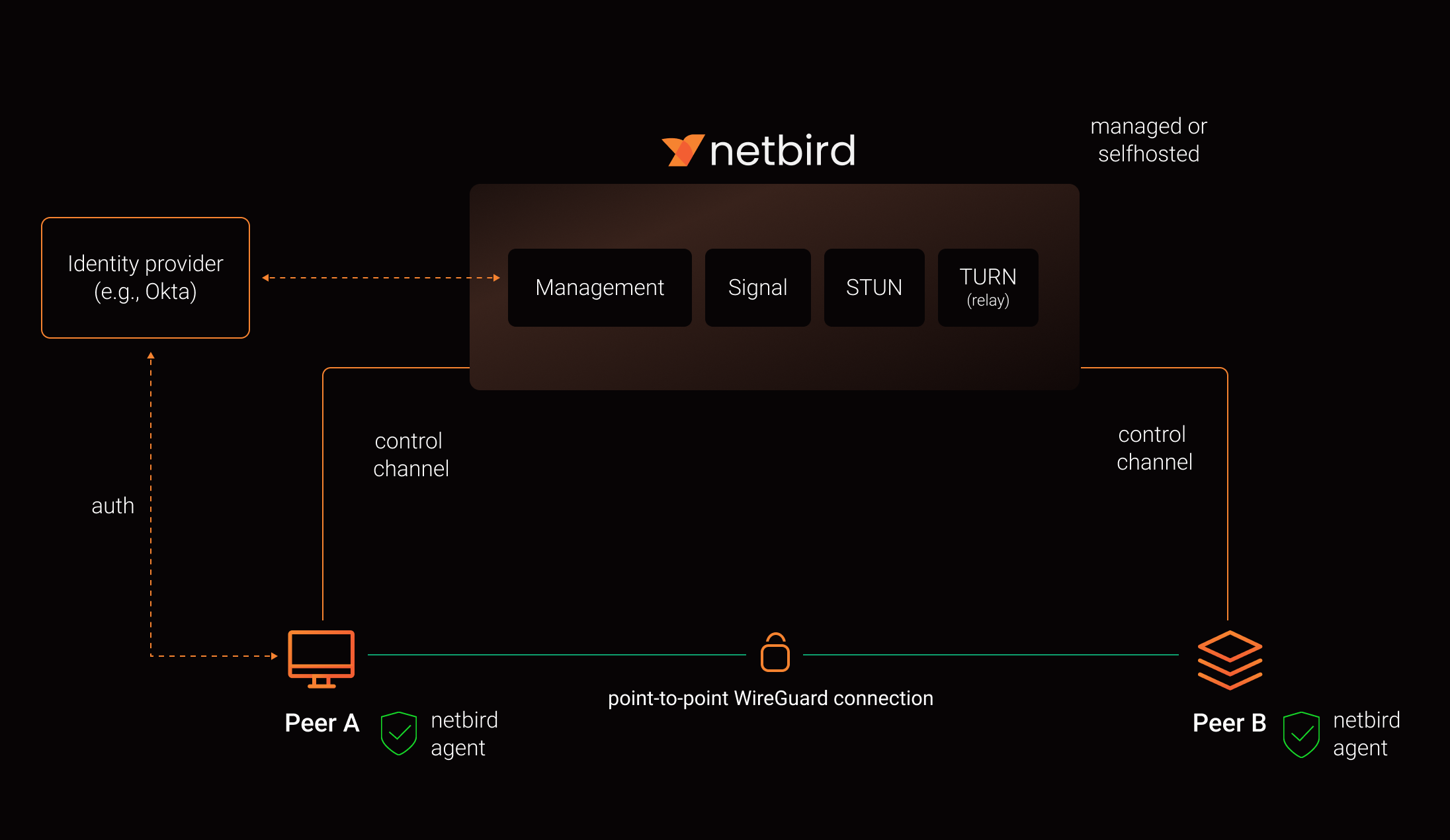
What we are building:
| Component | Location | Purpose |
|---|---|---|
| Management Server | Azure B2s VM, West US 3 | Runs all NetBird server services (Management, Signal, Relay, STUN) behind Traefik with auto-TLS |
| Honolulu Routing Peer | gsi-nb-hnl-01 (10.100.7.50) on DATA003 or DATA004 Hyper-V | Routes remote users into the 10.100.7.0/24 LAN |
| Boulder Routing Peer | gsi-nb-bld-01 (10.15.0.50) on DATA001 or DATA007 Hyper-V | Routes remote users into the 10.15.0.0/24 LAN |
| Windows Clients | ~200 laptops | NetBird agent deployed silently via TacticalRMM |
Identity: Microsoft Entra ID (Azure AD) added as an external IdP alongside NetBird’s built-in local authentication. Users sign in with their existing corporate credentials.
Prerequisites Checklist
Section titled “Prerequisites Checklist”Complete these before starting Step 1.
- Azure subscription with permission to create VMs, NSGs, and public IPs
- Ability to create DNS A record for
netbird.gsisg.com - Access to the GSISG Entra ID tenant (App Registration permissions)
On-Premises
Section titled “On-Premises”- Hyper-V capacity on DATA003 or DATA004 (Honolulu) for a small Ubuntu 24.04 VM
- Hyper-V capacity on DATA001 or DATA007 (Boulder) for a small Ubuntu 24.04 VM
- Reserved IPs: 10.100.7.50 (Honolulu), 10.15.0.50 (Boulder)
- TacticalRMM admin access for script deployment
Network
Section titled “Network”- Outbound internet access on TCP 443 from all client machines (for management, signal, and relay)
- Outbound UDP 3478 from all client machines (for STUN/NAT traversal)
- No inbound ports required on office firewalls
Software
Section titled “Software”- Docker with docker-compose plugin,
jq,curl(installed in Step 1) - NetBird MSI installer URL:
https://github.com/netbirdio/netbird/releases/latest/download/netbird_installer_windows_amd64.msi
Installation Roadmap
Section titled “Installation Roadmap”Follow these steps in order. Each step builds on the previous one.
| Step | Title | Time Estimate |
|---|---|---|
| Step 1 | Management Server | 30-45 min |
| Step 2 | Entra ID Integration | 20-30 min |
| Step 3 | Routing Peers | 45-60 min |
| Step 4 | Access Policies | 20-30 min |
| Step 5 | Client Deployment | 30-45 min (pilot), days (full rollout) |
| Step 6 | Verification and Monitoring | 30-45 min |
Total estimated time (excluding full rollout): 3-4 hours for a single administrator.
Key Design Decisions
Section titled “Key Design Decisions”These decisions are baked into the steps that follow:
-
Quickstart deployment method — uses the combined
netbird-servercontainer (Management + Signal + Relay + STUN in one image) with built-in Traefik for auto-TLS. This is the recommended approach for new deployments. -
Management Setup (Recommended) for Entra ID — adds Entra ID as an external identity provider alongside NetBird’s embedded IdP. Local admin accounts remain as a break-glass fallback.
-
Network Routes (not Networks) for site-to-site routing — the newer “Networks” feature does not yet support bidirectional site-to-site routing between offices, so Network Routes are required.
-
Masquerade ON for all routes — simplifies configuration by eliminating the need for return routes on office network equipment.
-
SQLite database — sufficient for ~200 peers. Can be migrated to PostgreSQL later if needed.
-
--network-monitor=falseon Windows clients — required during the GlobalProtect coexistence period to prevent interface conflicts.