Step 1: Management Server
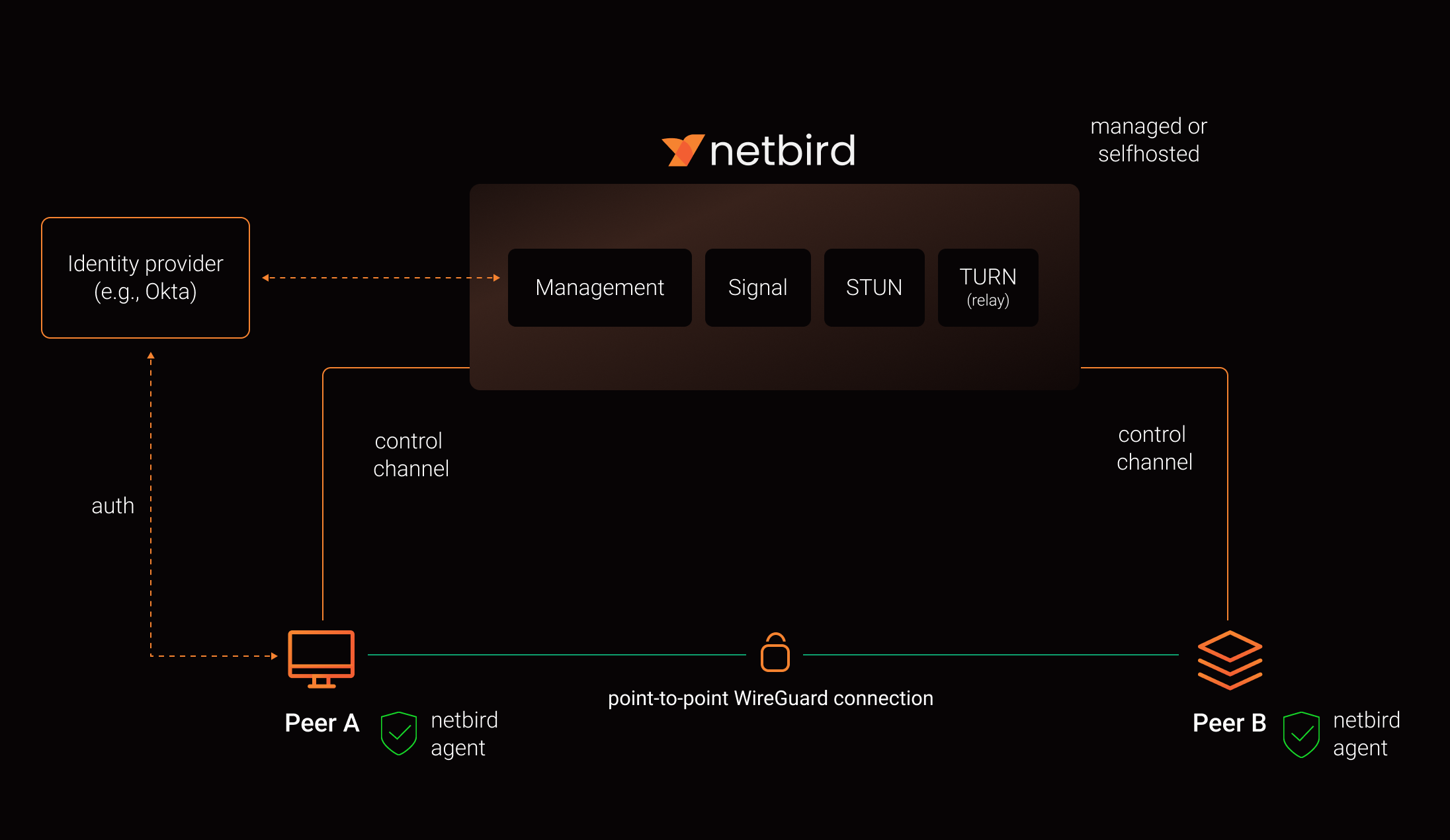
This step provisions the Azure infrastructure and deploys NetBird’s management server at netbird.gsisg.com.
1.1 Choose Your Azure VM
Section titled “1.1 Choose Your Azure VM”You have two options: use the existing GSI-AZ-IDM VM (recommended — saves ~$35-51/month) or provision a new dedicated VM.
Option A: Use Existing GSI-AZ-IDM (Recommended)
Section titled “Option A: Use Existing GSI-AZ-IDM (Recommended)”GSI-AZ-IDM is already running Ubuntu 24.04 with Docker and has more than enough capacity for NetBird alongside its current Prefect workloads.
| Setting | Value |
|---|---|
| VM Name | GSI-AZ-IDM (existing) |
| Resource Group | rg-idm-webapp-prod |
| Region | West US 2 |
| Size | B2s v2 (2 vCPU, 8 GiB RAM) — double the recommended minimum |
| Public IP | 4.154.241.58 (already assigned) |
| Private IP | 10.50.0.16 |
| VNet | GSI-AZ-NET / GSI-AZ-SUB01 |
| Additional cost | $0/month — already paid for |
NetBird’s management server uses ~1 CPU and ~2 GB RAM for signaling only (no data-plane traffic). With 8 GB RAM, there is ample headroom for both Prefect and NetBird.
To proceed with this option: Skip to 1.2 Configure the NSG and add the required ports to GSI-AZ-IDM’s existing NSG. Then point DNS to 4.154.241.58.
Option B: Provision a New Dedicated VM
Section titled “Option B: Provision a New Dedicated VM”If you prefer to keep NetBird isolated from other workloads:
| Setting | Value |
|---|---|
| Resource Group | rg-netbird-prod (or your naming convention) |
| VM Name | vm-netbird-mgmt-01 |
| Region | West US 3 (Phoenix, AZ) |
| Image | Ubuntu 24.04 LTS (Gen2) |
| Size | B2s (2 vCPU, 4 GiB RAM) |
| Authentication | SSH public key |
| OS Disk | 30 GB Premium SSD |
| Public IP | Static SKU Standard |
| Additional cost | ~$35-51/month |
az group create --name rg-netbird-prod --location westus3
az vm create \  --resource-group rg-netbird-prod \  --name vm-netbird-mgmt-01 \  --image Canonical:ubuntu-24_04-lts:server:latest \  --size Standard_B2s \  --admin-username azureadmin \  --generate-ssh-keys \  --public-ip-sku Standard \  --public-ip-address-allocation Static \  --os-disk-size-gb 30 \  --storage-sku Premium_LRS
Note the public IP from the output — you need it for the DNS record.
1.2 Configure the NSG (Network Security Group)
Section titled “1.2 Configure the NSG (Network Security Group)”Open these inbound ports on the VM’s NSG. NetBird consolidates Management, Signal, and Relay behind ports 80/443 via Traefik. Only UDP 3478 (STUN) is exposed directly.
| Priority | Name | Port | Protocol | Source | Purpose |
|---|---|---|---|---|---|
| 100 | AllowHTTP | 80 | TCP | Any | Let’s Encrypt ACME challenge, HTTP-to-HTTPS redirect |
| 110 | AllowHTTPS | 443 | TCP | Any | Dashboard, Management API/gRPC, Signal gRPC, Relay WebSocket |
| 120 | AllowSTUN | 3478 | UDP | Any | STUN server for NAT traversal |
| 200 | AllowSSH | 22 | TCP | Your admin IPs | SSH management access |
az network nsg rule create \  --resource-group rg-netbird-prod \  --nsg-name vm-netbird-mgmt-01NSG \  --name AllowHTTP --priority 100 \  --destination-port-ranges 80 --protocol Tcp --access Allow
az network nsg rule create \  --resource-group rg-netbird-prod \  --nsg-name vm-netbird-mgmt-01NSG \  --name AllowHTTPS --priority 110 \  --destination-port-ranges 443 --protocol Tcp --access Allow
az network nsg rule create \ --resource-group rg-netbird-prod \ --nsg-name vm-netbird-mgmt-01NSG \ --name AllowSTUN --priority 120 \ --destination-port-ranges 3478 --protocol Udp --access Allow1.3 Configure DNS
Section titled “1.3 Configure DNS”Create an A record with your DNS provider:
| Type | Name | Value | TTL |
|---|---|---|---|
| A | netbird.gsisg.com | <VM Public IP> | 300 |
Wait for DNS propagation before proceeding. Verify with:
dig +short netbird.gsisg.comThe output should match your VM’s public IP address.
1.4 Install Docker and Prerequisites
Section titled “1.4 Install Docker and Prerequisites”SSH into the VM and install Docker with the Compose plugin, plus jq and curl:
ssh azureadmin@netbird.gsisg.com# Update systemsudo apt update && sudo apt upgrade -y
# Install prerequisitessudo apt install -y ca-certificates curl gnupg jq
# Install Docker (official method)sudo install -m 0755 -d /etc/apt/keyringscurl -fsSL https://download.docker.com/linux/ubuntu/gpg | sudo gpg --dearmor -o /etc/apt/keyrings/docker.gpgsudo chmod a+r /etc/apt/keyrings/docker.gpg
echo \ "deb [arch=$(dpkg --print-architecture) signed-by=/etc/apt/keyrings/docker.gpg] https://download.docker.com/linux/ubuntu \ $(. /etc/os-release && echo "$VERSION_CODENAME") stable" | \ sudo tee /etc/apt/sources.list.d/docker.list > /dev/null
sudo apt updatesudo apt install -y docker-ce docker-ce-cli containerd.io docker-buildx-plugin docker-compose-plugin
# Add your user to the docker group (avoids needing sudo for docker commands)sudo usermod -aG docker $USER
# Verifydocker --versiondocker compose versionLog out and back in for the group change to take effect.
1.5 Deploy NetBird
Section titled “1.5 Deploy NetBird”Run the quickstart installation script. This downloads the latest stable release and generates all configuration files.
curl -fsSL https://github.com/netbirdio/netbird/releases/latest/download/getting-started.sh | bashThe script will prompt you for:
- Domain name — enter
netbird.gsisg.com - Reverse proxy selection — press Enter to accept the default
[0] Traefik(recommended, includes auto-TLS via Let’s Encrypt) - NetBird Proxy service — enter
N(not needed for our use case)
What the Script Creates
Section titled “What the Script Creates”| File | Purpose |
|---|---|
docker-compose.yml | Defines Traefik, Dashboard, and NetBird Server containers |
config.yaml | Combined server config (listen addresses, STUN, relay auth, embedded IdP, database) |
dashboard.env | Dashboard environment (API endpoints, OAuth2/OIDC settings) |
The script automatically starts all containers. Verify they are running:
docker compose psYou should see three containers (netbird-traefik, netbird-dashboard, netbird-server) all in a running state.
Check logs for any errors:
docker compose logs --tail 501.6 Create the Admin Account
Section titled “1.6 Create the Admin Account”- Open
https://netbird.gsisg.comin your browser - You will be redirected to the
/setuppage (this page is only available when no users exist) - Create the admin account:
- Email: your IT admin email
- Name: your name
- Password: a strong password (store in your password manager)
- Click Create Account
After creating the account, you are redirected to the login page. Sign in with the email and password you just created.
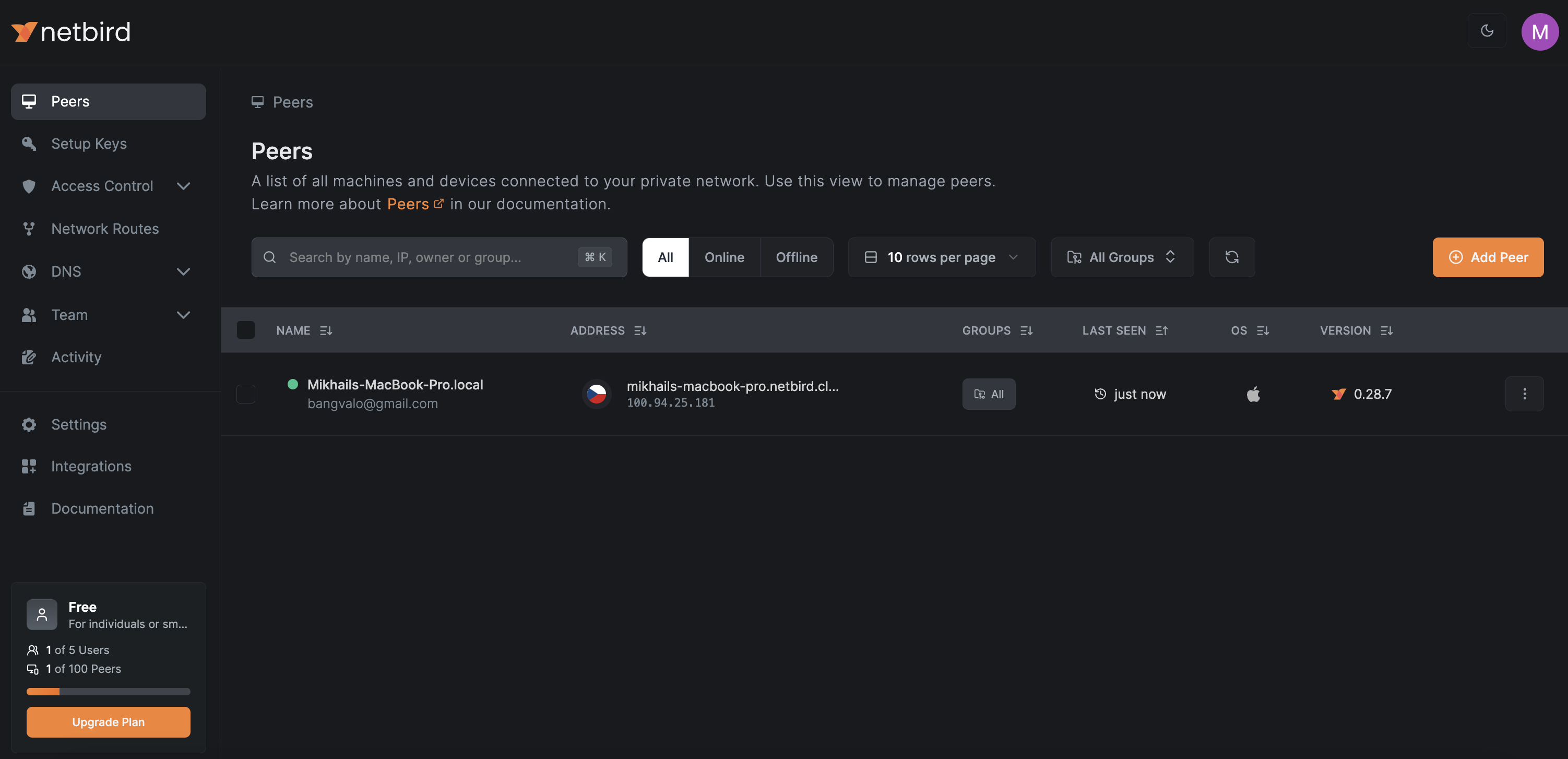
1.7 Record Critical Configuration Values
Section titled “1.7 Record Critical Configuration Values”Before proceeding, locate and securely store these values from config.yaml:
# On the VM, display the encryption keygrep encryptionKey config.yaml| Value | Location | Why It Matters |
|---|---|---|
server.store.encryptionKey | config.yaml | Encrypts setup keys and API tokens in the database. Losing this key means regenerating all setup keys and tokens. |
server.authSecret | config.yaml | Shared secret for relay authentication |
| Admin email/password | Your password manager | Break-glass local admin access |
1.8 Enable Auto-Start on Reboot
Section titled “1.8 Enable Auto-Start on Reboot”The Docker Compose services are configured with restart: unless-stopped, so they will restart automatically after a VM reboot. Verify Docker itself starts on boot:
sudo systemctl enable dockerVerification
Section titled “Verification”At this point you should have:
- Azure B2s VM running Ubuntu 24.04 in West US 3
- NSG rules allowing TCP 80, 443 and UDP 3478
- DNS record
netbird.gsisg.compointing to the VM’s static public IP - Docker Compose running Traefik + Dashboard + NetBird Server
- Valid Let’s Encrypt TLS certificate (automatic via Traefik)
- Admin account created and login verified
- Encryption key backed up securely
Next Step
Section titled “Next Step”Proceed to Step 2: Entra ID Integration to connect Microsoft Entra ID for SSO authentication.