Proposed Solution: NetBird + Microsoft SSPR
What is NetBird?
Section titled “What is NetBird?”NetBird is an open-source, WireGuard-based mesh VPN (v0.66.4, 23,700+ GitHub stars, 131+ contributors, backed by the German Federal Ministry of Education and Research). Unlike traditional hub-and-spoke VPNs (like GlobalProtect), NetBird:
- Has no exposed login portal — there is no web page for attackers to spray credentials against. Authentication is delegated to Microsoft Entra ID via OIDC. WireGuard silently drops unauthorized connections.
- Uses WireGuard encryption — formally verified cryptography (ChaCha20-Poly1305, Curve25519). WireGuard’s codebase is ~4,000 lines vs. 100,000+ for IPsec implementations.
- Connects devices directly (peer-to-peer) — traffic does not funnel through a central bottleneck
- Runs as a silent background service — auto-connects at boot via setup key, no user interaction required. Uses split-tunnel by default: only traffic destined for office networks (10.100.7.0/24, 10.15.0.0/24) goes through the tunnel. All other traffic (internet browsing, email, streaming) goes through the user’s normal internet connection untouched. Zero overhead on everyday internet usage.
- Is 100% open source and can be fully self-hosted at no per-user cost (BSD-3 client, AGPLv3 server)
- Integrates with Microsoft Entra ID for SSO via OIDC — users sign in with their existing Microsoft account, and their Entra ID group memberships (e.g., “Hawaii-Engineers”) automatically map to NetBird access policies
NetBird’s CVE history: Only 2 CVEs have ever been reported — both server-side management issues (default credentials in self-hosted installer, static IV in audit events DB). The WireGuard data plane has never been compromised.
Architecture
Section titled “Architecture”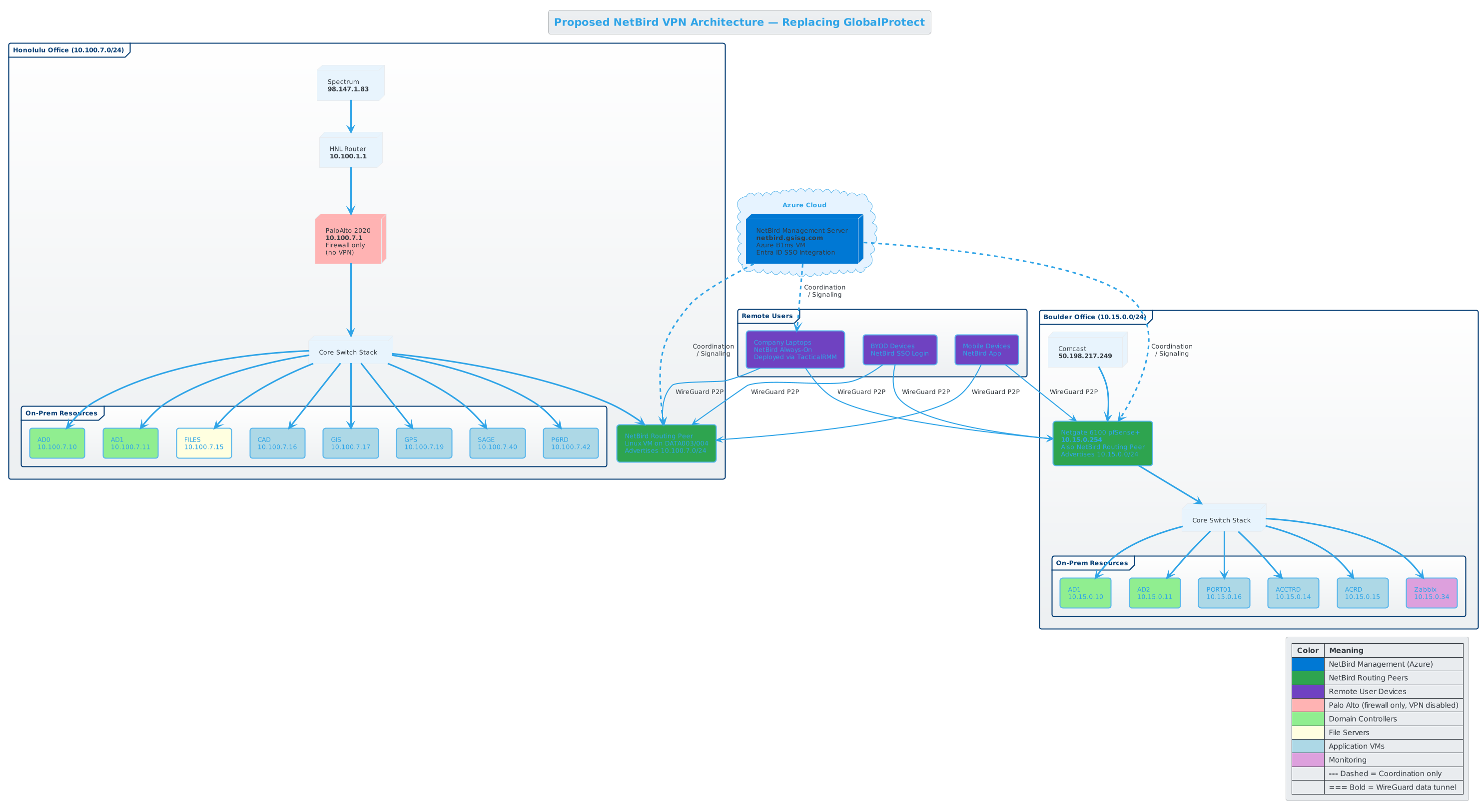
Click image to open full-size in new tab.
| Component | Specification | Location | Monthly Cost |
|---|---|---|---|
| NetBird Management Server | Azure B2s VM (2 vCPU, 4 GB RAM), Ubuntu 24.04 | Azure West US 3 (Phoenix) | ~$35-46 |
| Honolulu Routing Peer | Hyper-V VM (1 vCPU, 1-2 GB RAM), Ubuntu 24.04 | Honolulu, DATA003/DATA004 | $0 |
| Boulder Routing Peer | Hyper-V VM (1 vCPU, 1-2 GB RAM), Ubuntu 24.04 | Boulder, DATA001/DATA007 | $0 |
| NetBird Software | Self-hosted Community Edition | Azure + On-prem | $0 |
| DNS | netbird.gsisg.com -> Azure VM static IP | Cloudflare/registrar | ~$1 |
| Total | ~$36-47/month |
Key architectural notes:
- Management server in Azure provides high availability independent of any single office. No need to expose on-prem servers to the internet.
- Routing peers on Hyper-V VMs at both sites provide direct LAN access to office subnets at $0 additional cost. Native Linux is the best-supported platform for routing peers.
- The management server only handles coordination/signaling metadata. User data traffic flows peer-to-peer and never touches this server. Existing WireGuard tunnels survive management server outages.
- Embedded relay server handles NAT traversal. Estimated 5-15% of connections relay (mostly cellular/field workers).
- SQLite database is adequate for ~200 peers.
- Future scaling: For 500+ users or if GSISG adopts Azure Kubernetes, the management server can be migrated to a K8s cluster for auto-healing and easier scaling. Docker Compose on a single Azure VM is the right fit for the current deployment.
- Alternative deployment options: See Decision Points for pfSense native and Docker alternatives. See Cost Analysis for a full on-prem option at ~$3/month.
How This Solves the Password Reset Problem
Section titled “How This Solves the Password Reset Problem”The password reset has two parts — only the second one needs the NetBird tunnel:
Part 1: Reset the password (no tunnel needed)
The user goes to aka.ms/sspr in any browser, verifies with MFA, and types a new password. This happens entirely through the public internet — the password change flows through Microsoft’s cloud (Entra ID → Azure Service Bus → Entra Connect on-prem → Active Directory). No VPN required for this part.
Part 2: Update the laptop’s cached password (tunnel needed) After resetting, the user locks their laptop (Win+L) and unlocks with the new password. Windows needs to verify the new password against a Domain Controller via Kerberos (port 88). This is where NetBird matters — the always-on tunnel gives the laptop a direct path to the DC, so the cached credential updates immediately. Without this tunnel, the user would be locked out until they physically go to the office.
Step-by-step:
| Step | What Happens | Uses Tunnel? |
|---|---|---|
| 1 | NetBird service is running at boot — tunnel to routing peer is UP | — |
| 2 | User opens browser, goes to aka.ms/sspr | No (public internet) |
| 3 | User verifies identity via MFA (Authenticator app or phone) | No |
| 4 | User enters new password — Entra ID sends it to on-prem AD via password writeback | No |
| 5 | AD updated — new password is set in Active Directory | No |
| 6 | User locks workstation (Win+L) | — |
| 7 | User unlocks with NEW password — Windows validates against DC via Kerberos | Yes |
| 8 | Done — cached credentials updated, all future logins work | — |
Required ports through the NetBird tunnel for AD functionality: DNS (53), Kerberos (88, 464), NTP (123), RPC (135), LDAP (389), SMB (445), LDAPS (636), Global Catalog (3268, 3269), RPC ephemeral (49152-65535)
SSPR licensing requirement: Entra ID P1 minimum — included at no extra cost in Microsoft 365 Business Premium ($22/user/mo) or M365 E3 ($36/user/mo).
End-User Experience
Section titled “End-User Experience”For general staff (90% of users): Nothing changes from their perspective.
- TacticalRMM deploys NetBird silently as a Windows service
- No application to open, no tray icon to click, no login prompt
- The service starts at boot and runs in the background
- Their machine silently has access to Domain Controllers at both sites
- When they need to reset their password, they go to
aka.ms/ssprin any browser - No “connecting to VPN” step — it’s already connected
For power users (10%): Same experience, plus resource access.
- Same silent background service
- SMB shares (mapped drives) work as if they’re in the office
- RDP to CAD/GIS/SAGE VMs works normally
- No manual VPN connect/disconnect cycle
For IT: Web-based management dashboard.
- Visual access control policies (no JSON editing)
- Group sync from Entra ID via JWT claims at login
- Activity monitoring and peer health
- REST API for integration with Zabbix or other monitoring